Rich Notes
The Rich Notes snap-in is essentially an RTF file embedded and displayed in a JustWare snap-in. You can upload rich text and plain text files into the Rich Notes snap-in and all formatting will be preserved.
One advantage of the Rich Notes snap-in is that rich text files can contain images, and thus the Rich Notes snap-in can display images on screen. You could, for example, upload mug shots to name sessions. These mug shots can be prominently displayed in the Rich Notes snap-in for quick access. Nowhere else in JustWare is this possible. If you save the mug shot in the filing cabinet, you must open the file before it can be seen.
Rich Notes can be saved externally to your local computer or a network.
Text that you type directly into the Rich Notes snap-in can be formatted within JustWare.
Only one rich text note can be created for a name record. You can, however, create an ongoing formatted record
by creating dated sections.
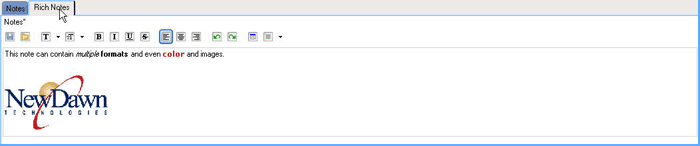
Creating Rich Notes
- Click the Rich Notes snap-in in any
open session.
- Add content to the Rich Notes snap-in.
- Type in text and format it using the formatting toolbar.

- Upload a rich text or plain text file to the Rich Notes snap-in:
- Click the Open button
 on the toolbar.
 - Browse to the file you would like to upload.
- Select the file, and click Open. The content
of the file will be displayed in the Rich Notes snap-in.
- If desired, when editing a Rich Notes record, add an Edit
Stamp
 to record who made changes and
when. The information displayed is the user's Windows login.
to record who made changes and
when. The information displayed is the user's Windows login.
-
Tip: You can save the Rich Notes snap-in as an RTF file outside of
JustWare by clicking the
Save to File button

.
Deleting Rich Notes
- Click the Rich Notes snap-in in any
open session.
- Delete the text that you would like eliminated from the Rich Notes snap-in.
-